How It Works
A simple guide to what SpeakNow does and how a typical session works — perfect for first-time users.
SpeakNow is an AI voice coach that listens to you speak English, responds in real time, and gives you a detailed breakdown of how you did — all in one session. No waiting for a human tutor. No scheduled appointments.
Here is what a typical journey looks like.
Your journey at a glance
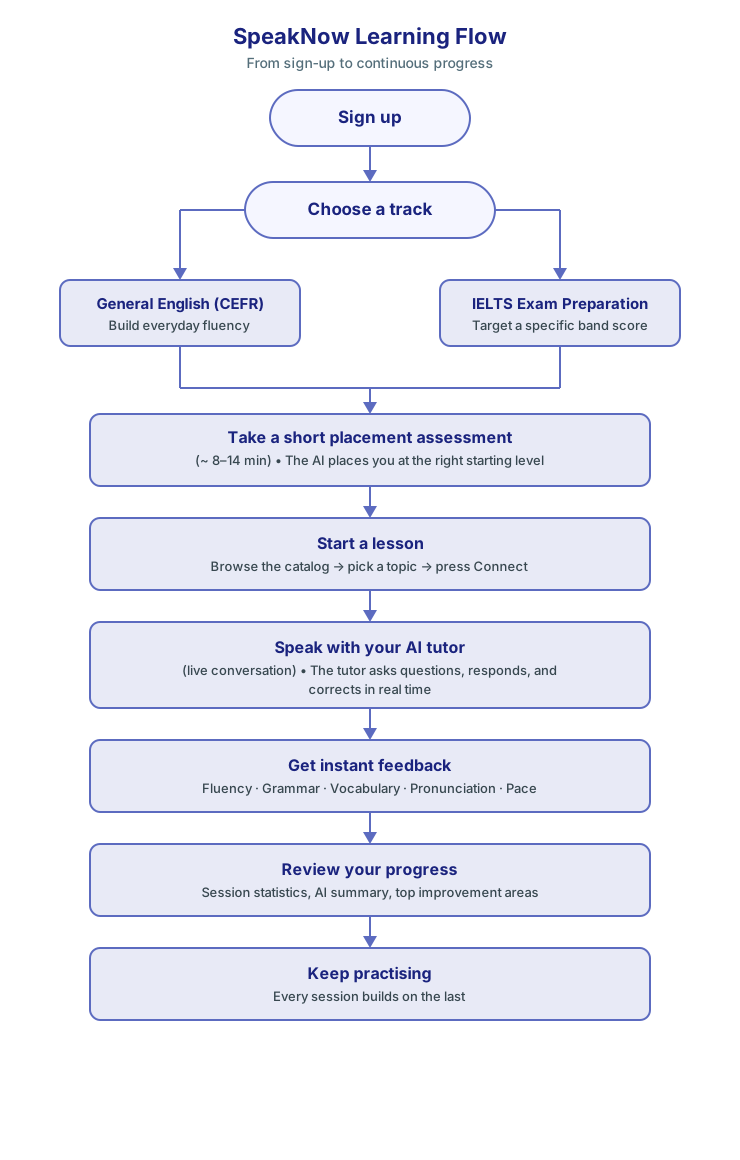
Step 1 — Choose your track
When you first sign in, you will see two tracks:
| Track | What it is | Best for |
|---|---|---|
| CEFR — General English | Conversations from A1 (beginner) to C2 (near-native) | Everyday life, work, social situations |
| IELTS Preparation | Simulated Part 1, 2, and 3 interview practice | Reaching a target band score for university or immigration |
You can switch tracks at any time. Progress is tracked separately for each.
Step 2 — Take the placement assessment
Before you browse lessons, take the short placement assessment. The AI conducts a brief spoken interview and places you at your actual level so you start on material that challenges you — not material that bores you or overwhelms you.
- CEFR placement — about 8 minutes, places you at A1–C2.
- IELTS mock — about 14 minutes, estimates your current Speaking band.
You can skip this and browse freely, but you will get better results starting at the right level.
Step 3 — Start a lesson
Pick a lesson from the catalog. Each lesson card shows the level, duration, topic, and learning objectives. Press Connect when you are ready. The AI tutor speaks first — answer when it finishes.
Step 4 — Speak with your AI tutor
The session runs like a real conversation. The AI tutor:
- Asks you questions on the lesson topic.
- Listens to your full answer before responding.
- Gently corrects grammar and models better vocabulary mid-conversation.
- Adapts to your pace — speak slower or faster and it follows.
A live transcript appears on screen as you speak so you can read what you said.
Step 5 — Get instant feedback
The moment you disconnect, your Feedback Panel loads with eight metrics:
| Metric | What it measures |
|---|---|
| Turn share | How much of the conversation was yours |
| Word share | Your share of the total words spoken |
| Filler words | Frequency of "um", "uh", "like", "you know" |
| Pace | Words per minute — compared to a natural conversational range |
| Fluency score | How smoothly you spoke without long pauses |
| Grammar score | Accuracy of your sentence structures |
| Vocabulary score | Range and precision of the words you used |
| Pronunciation score | Clarity and accuracy of individual sounds |
Each metric includes a target range and a short explanation of how to improve.
Step 6 — Review your progress
The Progress screen also shows:
- An AI-written summary of your session.
- Your top two or three improvement areas — the things that will make the biggest difference next session.
- A Download Report button to save a PDF for your records.
Every session you complete is logged. Over time you can see your scores trending upward as your speaking improves.
Ready to start?
Follow the Quick Start guide to set up your profile and run your first session in under ten minutes.